
To make things easier for you, two new services are now available, allowing you to register your texts and download your audiovisual catalog.
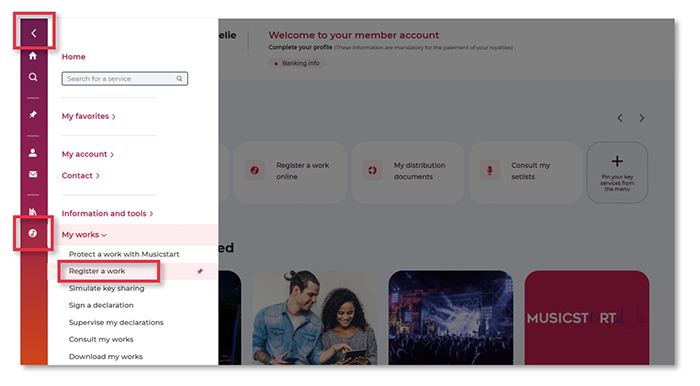
To access them, go to your member account, then Menu > My works > Register a work > Register a dubbing/subtitling text.
Register your dubbing/subtitling texts
This service allows you to register the dubbing or subtitling text for a film or one or more episodes of a series in three steps:
1. Select the audiovisual work – film, series episode(s) (it must have been registered with Sacem beforehand*). When registering the dubbing/subtitling text of a series, you can select multiple episodes.
2. Add information about the dubbing or subtitling text. You must be the sole author, your text must be in French, and it must cover the entire audiovisual work*.
3. Validate the registration.
Once your registration is complete, your work will appear in your catalog within three days.
*If the audiovisual work does not exist or if there is already a dubbing or subtitling text registered for this audiovisual work, you will be asked to contact Sacem via the secure messaging in your member account.
If there are several authors, if your text is in a language other than French or if it does not concern the entire audiovisual work, please register your work using this form.
Download your audiovisual catalog
From the same service, you can download your audiovisual catalog, which is the complete list of films and series episodes using your dubbing/subtitling texts.
Please note: The dubbing and subtitling texts registered online appear in your catalog under the name of the audiovisual work they are attached to.
To learn more...
... and receive guidance on how to use these new services, two tutorials are made available to you:
- How to register a dubbing or subtitling text onligne?
- Author of dubbing/subtitling texts: view and download your catalog
Published January 20 2026